The short answer
Keep one reviewed source for each skill, choose the discovery path and scope for each agent, inspect existing targets and synchronize the complete directory. Then verify discovery and execution in each client. Shared SKILL.md content does not guarantee shared paths, dependencies or behavior.
One format, several discovery paths
Claude Code, Codex and Cursor can work with skills built around SKILL.md. That shared format makes instructions portable. It does not mean that every client discovers the same directory, supports every optional field or provides the same tools.
Before copying a skill, separate three questions: where is its source, where should each client discover it and what does the procedure require at runtime? This prevents a common failure: treating a successful file copy as a successful integration.
| Agent | Project location | What to check |
|---|---|---|
| Claude Code | .claude/skills/ | Command discovery and invocation controls |
| Codex | .agents/skills/ | Working-directory discovery and selected skill path |
| Cursor | .agents/skills/ or .cursor/skills/ | Shared, native and compatibility-path discovery |
Cursor also documents compatibility directories, including Claude and Codex paths. That can be useful, but it makes duplicate copies more likely. Check what your installed version already sees before creating another directory.
Choose a source of truth
Pick one place where edits happen. A team might keep portable project skills in a repository. A personal library might come from a separate Git repository or a local directory. The target copies should have a clear relationship to that source.
A small team can start with a simple review process: edit the source, inspect the diff, test the procedure and then update selected targets. Avoid editing several agent copies independently unless you intentionally want different behavior.
skill-library/
└── review-change/
    ├── SKILL.md
    └── references/
        └── review-checklist.md

Targets depend on client and scope:
  Claude Code → .claude/skills/review-change/
  Codex       → .agents/skills/review-change/
  Cursor      → a documented shared or native location
The arrows describe placement, not a requirement to create three physical copies. If two clients already consume the same shared directory, use that deliberately and verify it. A filesystem symlink is another possible arrangement, but support, permissions and platform behavior need to be checked before relying on it.
Inspect before synchronizing
Read the target before replacing it. An existing directory can contain local edits, supporting files or a different skill with the same name. Compare the whole skill directory, rather than only the Markdown file, because a script or reference update can change behavior.
- Confirm the source repository or local directory and the version you reviewed.
- List the intended clients and choose project or personal scope.
- Inspect existing target content and preserve changes you still need.
- Copy or synchronize the complete directory.
- Open each client and verify discovery and a representative task.
For a Git source, an immutable commit identifies exactly what you tested. A branch name alone can move between installations. Keep enough provenance to explain why two machines behave differently.
What Skiller adds to the workflow
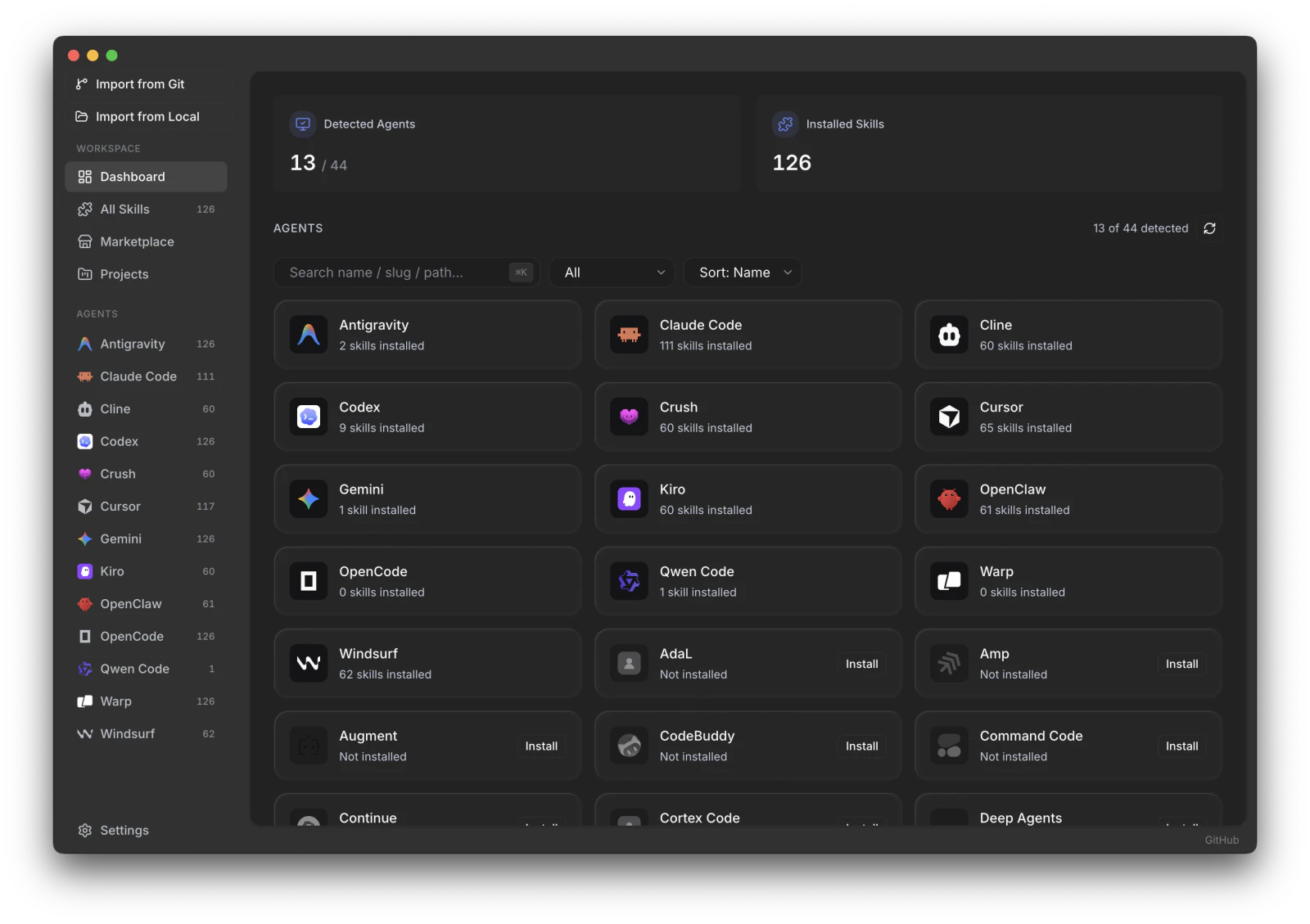
Skiller provides a desktop inventory of detected agents and installed skills. Its Skills Manager shows skill content and the agents that consume it, offers a Markdown editor and supports synchronizing installations. Sources can be registered from a Git URL or local folder, while the Marketplace offers skills.sh and ClawHub discovery.
The practical benefit is visibility: you can inspect the current content and destination paths before changing a set of agent installations. Start with a single reviewed skill and a small set of targets. Confirm the path and scope in the app rather than assuming a shared directory always applies.
Agent detection and skill discovery are different. Skiller's detection guards do not treat an otherwise empty skills directory as proof of an installed agent. Install the client first, then confirm detection and test the skill inside that client.
Keep the instructions portable
Use the shared frontmatter fields for the core procedure. Document required CLIs, operating-system assumptions and external services. Client-specific invocation controls belong in a consciously maintained variant when the same file cannot serve every target.
A review skill that reads a diff is relatively portable. A skill that invokes a particular MCP tool name, assumes a macOS-only app or depends on a shell script has a larger compatibility surface. Test those dependencies in each environment; copying the directory does not provide them.
If tool access is the uncertain part, read skills vs MCP. A skill describes the procedure, while an MCP connection supplies separately configured capabilities.
Verify updates and diagnose drift
After an update, confirm which file each client selected and run the same small test task. Record what changed and which targets were checked. If only one client behaves differently, inspect its selected path, optional metadata and available tools before rewriting the shared instructions.
- Content drift: compare source and target directories, including references and scripts.
- Discovery drift: check working directory, scope, duplicate names and client reload behavior.
- Environment drift: check CLI versions, permissions and MCP configuration.
- Procedure drift: retest assumptions when the product or repository changes.
A library stays maintainable when its ownership and verification are clear. Keep the source understandable, keep the target set intentional and make the client test part of installation rather than an optional last step.
FAQ
Can one skill be used in Claude Code, Codex and Cursor?
The shared SKILL.md format makes reuse possible, but discovery paths, invocation and supported metadata vary. Verify each client rather than assuming identical behavior.
How do I avoid overwriting custom skill instructions?
Keep a reviewed source of truth and compare local edits before updating or synchronizing. Test the resulting content in the intended targets.
Does Skiller sync skills between computers?
This guide covers synchronization across agents on one computer. Device synchronization requires a separate mechanism; do not assume cross-agent sync includes cloud backup.
Your skills. One place.
Inspect, edit and sync your skill library across coding agents.
Download Skiller