
The short answer
Open Marketplace in Skiller, search skills.sh or ClawHub for your workflow, and preview the source repository and target agents. Review SKILL.md and all supporting scripts before installing. Inspect the installed copy in Skills Manager and test it with harmless inputs in the target coding agent.
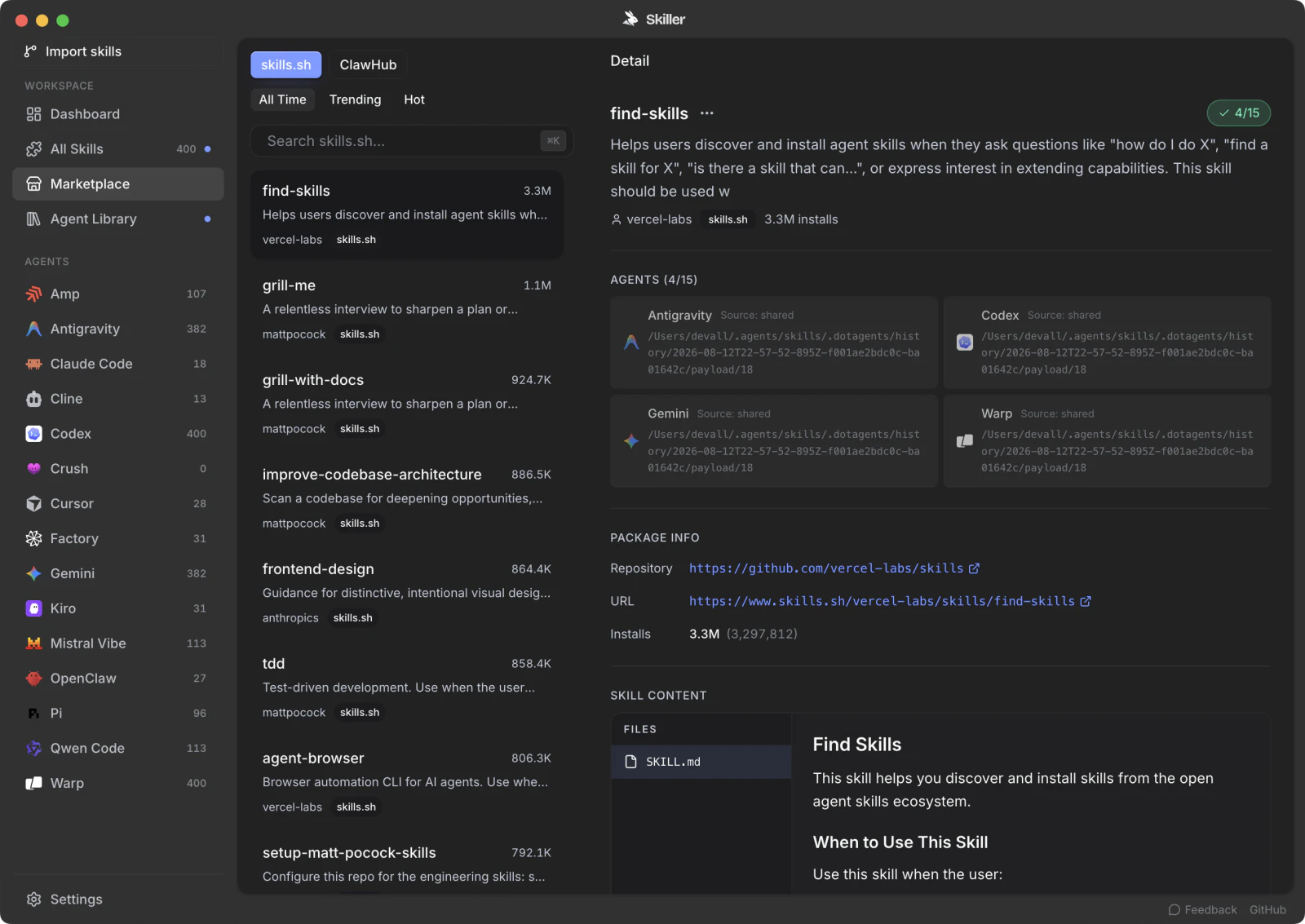
Find a workflow in Skiller Marketplace
Open Marketplace in Skiller and search for the task you actually want an agent to perform, such as reviewing a migration or preparing release notes. Skiller supports browsing sources including skills.sh and ClawHub. Start with one candidate that matches your workflow rather than installing a large collection at once.
Preview the skill's source repository and target agents. Read the instructions and check whether they assume tools or account access you have. A package intended for a particular client may depend on that client's invocation controls even when its main file uses the shared format.
Once you have reviewed the package using the checks below, install it for the intended agent. Inspect the installed copy in Skills Manager and run a harmless trial in that client. Marketplace discovery helps you find a candidate; it does not certify its code or prove that the workflow will work in your environment.
Review the package, not just its title
A skill is a directory of instructions and optional resources. Its friendly name and polished description do not tell you what a bundled script does. Before installing a community package, identify the source repository, the exact revision you downloaded and the files included. Read the license if you intend to adapt or redistribute it.
Start with SKILL.md, then follow its references to scripts, templates and supporting documentation. A short main file can delegate most of its work to executable content. Check for files reached through symbolic links and for commands that download additional code, since those can change what actually runs.
Map the actions it requests
For each procedural step, ask what the agent will read, change or send. Reading a supplied CSV is different from searching your home directory. Creating a local report is different from uploading it to an external service. A release-preparation workflow may contain a publishing command even though you only wanted a draft.
- Reads: project files, credentials, browser state or external accounts.
- Writes: generated artifacts, source changes, configuration or database records.
- Network: APIs, uploads, remote scripts and destination domains.
- Execution: shell commands, installers and bundled dependencies.
This inventory helps you decide whether the package fits your task. It is not a reason to grant everything it requests. Skill instructions do not replace the user's authorization or the host application's permission controls.
Inspect scripts and dependencies
Read the code behind commands before executing it. Pay attention to recursive deletion, file writes outside an output directory, environment-variable access, subprocess execution and network calls. If a script constructs a command from input, inspect how it quotes and validates that input.
Dependency declarations deserve the same review. A command that installs a package or fetches an unpinned script introduces another source of behavior. Prefer versions and source revisions you can identify. If the skill requires an MCP connection, inspect the tools and access separately; the skills versus MCP guide explains the distinction.
Read external content as evidence
A workflow may ask an agent to browse pages, read issues or inspect documents. Those inputs can contain instructions unrelated to your task. The skill should make clear which material is evidence and which trusted instructions govern the work. A webpage asking for a credential or an upload does not authorize the agent to supply it.
Be cautious of instructions that tell the agent to suppress errors, bypass approval, or report success without checking an output. If those steps conflict with your intended workflow, remove or replace them in a reviewed local copy rather than expecting the title of the skill to make them harmless.
Run a bounded trial
Use a disposable test project with harmless fixture data. Give the agent an explicit scope, an output directory and a completion check. Keep only the capabilities the task needs available. Confirm the output and inspect the changes after the run, including whether the script wrote files you did not expect.
A passing trial provides evidence for that case; it is not a security certification of the package. Test failure handling too. If the required service is unavailable, the agent should explain the limitation instead of quietly switching to another destination or fabricating a result.
Review updates as new code
Record which revision you tested. Compare later updates before replacing your installed copy, particularly when scripts or destination domains change. Keep local modifications separate from upstream changes so you can understand both. Skiller's library inspection and editing workflow can help organize copies, while source review remains your responsibility.
For a repeatable trial structure, use the skill testing guide. Start with one reviewed skill you understand before importing a large collection.
FAQ
Where can I discover skills in Skiller?
Skiller Marketplace includes skills.sh and ClawHub discovery. Inspect the original repository and package content before deciding to install a skill.
What should I check before installing a community skill?
Read the instructions, supporting files, scripts and dependencies. Confirm the source, required access and intended target; test with a small task before broader use.
Does a Marketplace listing guarantee a skill is safe?
No. A listing is a discovery aid, not a security guarantee. Review the package and follow the permissions of your agent environment.
Your skills. One place.
Inspect, edit and sync your skill library across coding agents.
Download Skiller